For users who want to stream IPTV on PC and Mac, there are several great players to choose from. Two of the most well-known free and open-source options are IPTV Smarters Pro — available both as a downloadable app and as an online browser-based version — and MyIPTV Player, both offering a clean interface and easy setup with your Australia IPTV subscription.
For a more premium experience, players like Hotplayer, SmartOne IPTV, and IBOPlayer deliver advanced features, smoother performance, and a more polished interface for users who want the best possible streaming experience on their desktop or laptop.
Choose your IPTV player
IPTV Smarters Pro
MyIPTV Player
Iboplayer
Hotplayer
👉 Download from the Microsoft Store or Mac App Store. Alternatively, you may download these apps directly from their official websites.
Disclaimer
All third-party applications and tools mentioned in this setup guide are the sole property of their respective developers and owners. Australia IPTV is not affiliated with, endorsed by, or responsible for any of these applications. We simply recommend them as they are widely used and compatible with our service. Always download apps from their official sources.
IPTV Smarters Pro (OPEN SOURCE)
1. Download the App
- Visit the official IPTV Smarters website at www.iptvsmarters.com and navigate to the downloads section.
- Make sure to select the correct version for your device — Windows 32-bit, Windows 64-bit, or macOS.
- If you are unsure which version to choose, check your system settings under About This PC (Windows) or About This Mac (Mac).
2. Install the App
- Once the installer file has finished downloading, open your Downloads folder and locate the file.
- Double-click the installer and follow the on-screen instructions to complete the installation.
- The process takes less than a minute.
Once finished, IPTV Smarters Pro will be available on your desktop or in your Applications folder (Mac).
3. Launch & Connect
Open IPTV Smarters Pro and you will be greeted with the login screen. Choose one of the following methods to connect your Australia IPTV subscription:
- Login with Xtream Codes API (recommended) — Enter your playlist name (Australia-IPTV or any name), Server URL, Username, and Password provided by Australia IPTV, then click ADD PLAYLIST
- Load Playlist (M3U URL) — Paste your M3U URL directly into the provided field and confirm
When copying and pasting, make sure the URL starts with http:// and not https://, because it automatically changes otherwise.
Prefer Not to Download Anything?
You can also access the full IPTV Smarters Pro online version directly from your browser, no download, no installation required.
Simply click Here to open the web-based player or visit http://webtv.iptvsmarters.com/
Press Add Playlist and log in with your Australia IPTV credentials exactly as described above.
When copying and pasting, make sure the URL starts with http:// and not https://, because it automatically changes otherwise.
You get access to all the same features, channels, and content as the desktop app, from any browser on any computer, Windows, Mac, Linux, or Chromebook.
It’s the quickest and most convenient way to start streaming IPTV on PC and Mac instantly.
MyIPTV Player (OPEN SOURCE)
1. Download & Install
- Click Here to go directly to the Microsoft Store,
- Click Get and wait for the app to download and install.
- Once done, click Launch.
2. Add Your Playlist
- Open the app and press Goto Settings.
- Select Add New Playlist, Xtream Codes, and EPG Source.
- Enter the login details provided by Australia IPTV and assign a name for easy identification.
- Click Add Xtream Source.
- Alternatively, you can upload your playlist using the M3U URL in the Remote Channel List section.
- Press Add Remote List and, if available, Add EPG Source to confirm.
When copying and pasting, make sure the URL starts with http:// and not https://, because it automatically changes otherwise.
3. Load Your Channels
- Go back to the home page,
- Click the Select Channel Playlist
- Choose the playlist you just added, and hit Refresh.
- Your full channel list will load automatically.
4. Start Streaming
Click Channels on the top left of the screen to browse your full channel list, or click Program Guide to view the TV schedule.
Double-click on any channel to start watching instantly. 🎉
💡 Tip: MyIPTV Player is available exclusively on Windows via the Microsoft Store.
Ibo Player Pro (Free to use for 7 days)
1. Download & Install
- Click Here to go directly to the Microsoft Store.
- Click Here to go directly to the Mac App Store.
- Click Get and wait for the app to download and install.
- Once done, click Launch.
2. Collect Device Credentials:
- Open the app on your PC. Instead of a single MAC address, these apps typically display two important pieces of information: a Mac address and a Device Key. Copy these exactly as shown
3. Log In to the Web Portal:
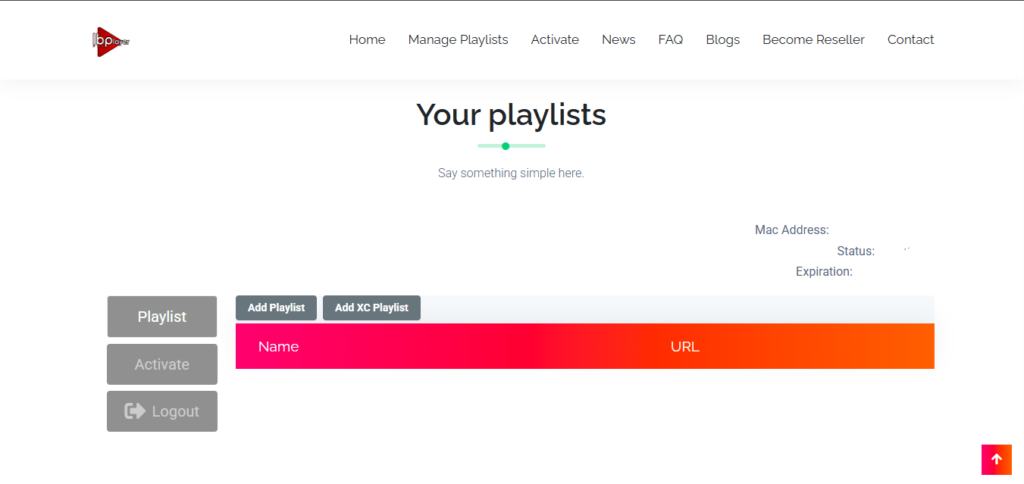
- On your computer or smartphone, go to the official Ibopro player portal here. (manage playlists)
- Enter your device’s Mac address and Device Key to log in .
4. Add Your IPTV Playlist:
- Once logged into the portal, look for the option to “Add Playlist.” You can now enter your subscription M3U Playlist URL: Simply paste the playlist link provided by your Australia-IPTV provider.
When copying and pasting, make sure the M3U URL starts with http:// and not https://, because it automatically changes otherwise.
5. Start Streaming
- Restart the app on your device.
- Your channels and VOD library should now appear automatically.
For App activation, please review the ibopro player’s pricing and follow their activation steps here
Hoplayer / HOT IPTV ( free for 30 days)
1: Download the App
- Click Here to go directly to the Microsoft Store,
- Click Here to go directly to the Mac App Store,
- Click Get and wait for the app to download and install.
- Once done, click Launch.
2. Open the App & Get Your MAC Address
Launch the Hotplayer app on your device.
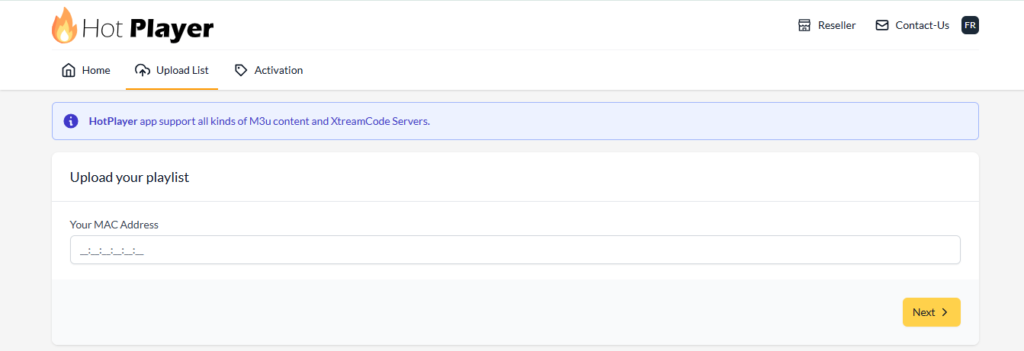
On the main screen, note down the MAC address displayed (this is unique to your device).
3. Visit the Official Hotplayer Website
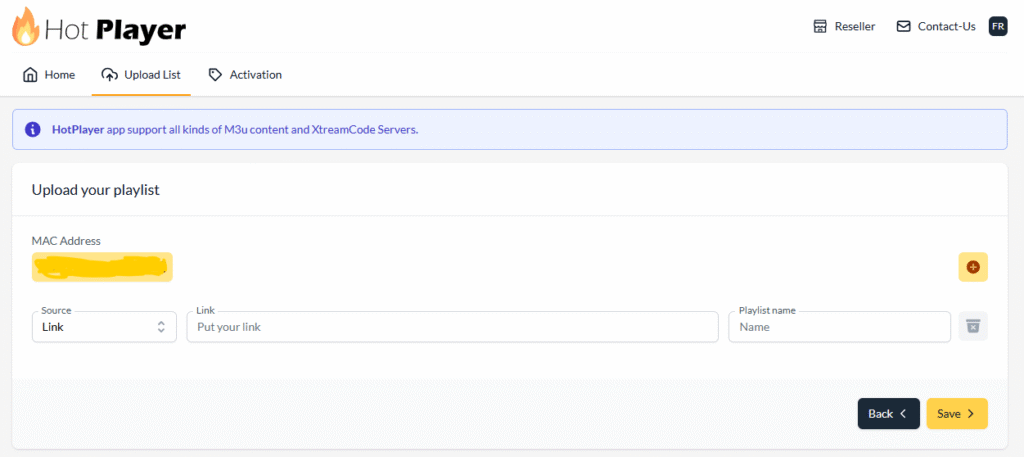
- M3U Playlist URL (the link provided by us).
When copying and pasting, make sure the URL starts with http:// and not https://, because it automatically changes otherwise.
- Playliste name : Australia-IPTV
5. Save
For App activation, please review the Hotplayer’s pricing and follow their activation steps here
The players listed above are our top recommendations for streming IPTV on PC and Mac, but many other options are available. You can find additional IPTV players directly on the Microsoft Store, the Mac App Store, or from their official websites. The setup process is the same across most players — simply enter your Xtream Codes credentials (Server URL, Username, and Password) or paste your M3U URL and you’re good to go.
If any player requests unfamiliar information such as an EPG URL, a portal URL, or a MAC address, just contact our support team via WhatsApp or Email and we’ll provide everything you need instantly.