Enjoy seamless, on-the-go entertainment with mobile IPTV streaming from Australia-IPTV. Simply download a compatible IPTV app like IPTV Smarters, GSE Smart IPTV, or TiviMate onto your smartphone or tablet, enter your unique subscription credentials, and instantly unlock access to hundreds of live Australian and international channels.
Start streaming in minutes and never miss a moment of the shows, matches, and broadcasts that matter to you.
Before getting started, make sure your device meets the basic requirements for a smooth streaming experience.
Device Requirements: Your device should have at least 2GB of RAM to ensure stable and uninterrupted playback. For HD and 4K streaming, 4GB RAM or more is recommended.
Internet Connection: A minimum speed of 10 Mbps for HD and 25 Mbps for 4K is required. Both Wi-Fi and 4G/5G are supported, though a stable Wi-Fi connection will always give the best results.
Download a Compatible App: Head to the App Store for iOS devices or the Google Play for Android devices and TV boxes. Search for your preferred IPTV player, install it, and you’re ready to go.
Install an IPTV player
Hotplayer
IPTV Smarters Pro
Tivimate (Android only)
IPTVX (IOS Only)
👉 Download from Google Play Store or Apple App Store. Alternatively, you may use the Downloader App to obtain a direct APK for Android devices
Disclaimer
All third-party applications and tools mentioned in this setup guide are the sole property of their respective developers and owners. Australia IPTV is not affiliated with, endorsed by, or responsible for any of these applications. We simply recommend them as they are widely used and compatible with our service. Always download apps from their official sources.
Hoplayer / HOT IPTV ( free for 30 days)
Hotplayer is not available on the Google Play Store. To install it on your Android phone or tablet, you first need to install the Downloader app and enable apps from unknown sources.
1: Download the App
Simply open the Downloader app, and enter the code 395800. The app will automatically locate and install Hotplayer for you, giving you direct access without any complicated steps.
2. Open the App & Get Your MAC Address
Launch the Hotplayer app on your device.
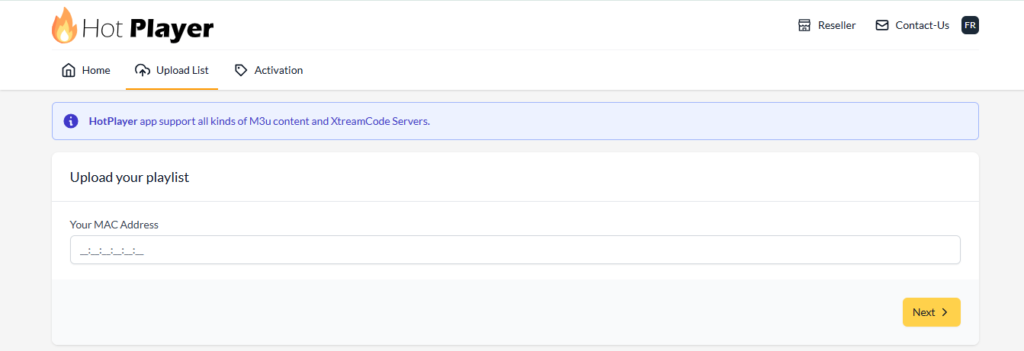
On the main screen, note down the MAC address displayed (this is unique to your device).
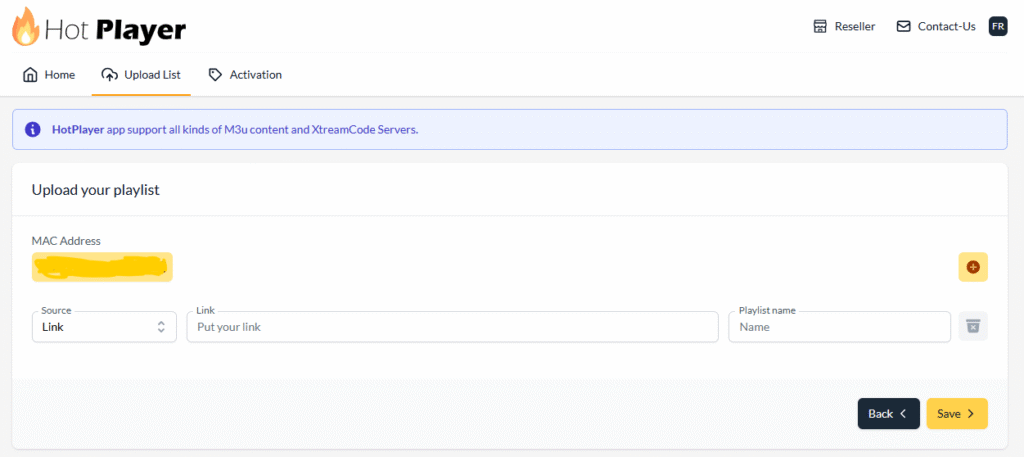
3. Visit the Official Hotplayer Website
- M3U Playlist URL (the link provided by us).
When copying and pasting, make sure the URL starts with http:// and not https://, because it automatically changes otherwise.
- Playliste name : Australia-IPTV
5. Save
For App activation, please review the Hotplayer’s pricing and follow their activation steps here
IPTV Smarters Pro (No free access)
1. Download the App
- Android: Open Play Store → Search IPTV Smarters Pro → Tap Install
- iOS: Open App Store → Search IPTV Smarters Pro → Tap Get
For non-Android / non-iOS devices you can install the app directly using the Downloader app.
Open Downloader, enter the code [6468112] in the search bar, and it will fetch and install the APK automatically — quick and easy, no other apps store needed.
2. Set Up the App
- Open IPTV Smarters Pro
- Tap Add New User
- Select Login with Xtream Codes API or Add URL/M3U
- If using Xtream Codes, enter:
- Name: Australia IPTV (or any name you prefer)
- Server URL: (provided by Australia IPTV Ex : http://hoste.site)
- Username: (provided by Australia IPTV)
- Password: (provided by Australia IPTV)
- If using M3U, paste your M3U URL in the provided field
- Tap Add User and wait for the playlist to load
- Select your profile and start streaming! 🎉
When copying and pasting, make sure the URL starts with http:// and not https://, because it automatically changes otherwise.
Tivimate (Android only) (No free access)
1. Download the App
- Open Google Play Store
- Search for TiviMate IPTV Player
- Tap Install and open the app
2. Set Up the App
- Open TiviMate and tap Add Playlist
- Select Xtream Codes (recommended) or M3U Playlist
- If using Xtream Codes, enter your Server URL, Username, and Password
- If using M3U, paste your M3U URL and tap Next
- Give your playlist a name (e.g. Australia IPTV) and tap Add
- Wait for the channels to load, this may take a minute
- Once loaded, browse your channels and enjoy! 🎉
When copying and pasting, make sure the URL starts with http:// and not https://, because it automatically changes otherwise.
IPTVX (IOS Only) (limited free version)
1. Download the App
- Open the App Store on your iPhone or iPad
- Search for IPTVX
- Tap Get and install the app
2. Set Up the App
- Open IPTVX and tap the + New Playlist icon to add a new source
- Select Xtream (recommended) or M3U Playlist
- If using Xtream Codes, enter your Playlist name (Australia-IPTV or any name), Server URL, Username, and Password and tap Connect
- If using M3U, enter Playlist name (Australia-IPTV or any name) and paste your M3U URL and tap Save
- Wait for your playlist to load
- Browse your channels and start watching! 🎉
When copying and pasting, make sure the URL starts with http:// and not https://, because it automatically changes otherwise.
The apps listed above are our top recommendations, but they are by no means your only options. Both the Google Play Store and the Apple App Store offer a wide variety of IPTV players that are fully compatible with your Australia-IPTV subscription,
The setup process is the same across most players. Simply download your preferred app, navigate to the add playlist or add account section, and enter your Xtream Codes credentials (Server URL, Username, and Password) or paste your M3U URL — exactly as described in the guides above. Most modern IPTV players follow the same standard login flow, so switching between apps is quick and straightforward.
However, some IPTV players may use slightly different terminology or request additional information such as an EPG URL, a portal URL, or a MAC address. If you ever come across a login screen that looks unfamiliar or requests credentials you don’t have, do not worry — simply reach out to our support team via WhatsApp or Email and we will provide you with all the necessary credentials and walk you through the setup step by step.